How Can You Make Bluetooth Headphones Louder: A Complete Guide

Have you ever cranked up the volume on your Bluetooth headphones, only for the sound to stay disappointingly low? Whether you’re listening to music, catching up on podcasts, or taking calls, it’s frustrating when the audio isn’t loud enough. The good news is that several factors could be causing this issue, and fortunately, this guide will walk you through simple solutions to boost your sound experience, without sacrificing sound quality or hearing health.
Why is My Headphone Volume So Low?
There are several reasons why your Bluetooth headphones might not be as loud as you want them to be. Let’s dive into the most common causes.
1. Dirty or Blocked Speaker Grilles
Over time, dust and debris can accumulate on the speaker grilles of your headphones, blocking the sound and reducing volume. Cleaning them regularly can help restore the sound quality.
2. Hardware Wear or Aging Components
As headphones age, their internal components, such as speakers and wiring, can wear out. This might result in decreased volume levels. If your headphones are old, this could be the reason they’re not as loud as they once were.
3. Poor Codec or Audio Format Compatibility
If your audio device or wireless headphones don’t support the same Bluetooth codec or audio format, the sound may be compressed or degraded, leading to lower volume and sound quality. Using incompatible codecs can significantly affect the overall listening experience.
Steps for Making Your Headphones Louder
Fortunately, there are a few practical steps you can take to boost the volume on your Bluetooth headphones.
1. Clean Speaker and Openings
Make sure the speaker grilles and any openings on your headphones are clean. Use a soft cloth or brush to gently remove dust, dirt, or earwax buildup that could be blocking sound.
2. Disable Volume Limit Settings
Some devices or apps have built-in volume limiters to protect your hearing. Check the settings on your phone, computer, or audio apps, and make sure these limits are turned off.
3. Update Audio Drivers or Apps
Outdated audio drivers or apps can affect volume and sound quality. Make sure your audio software is up to date by downloading the latest drivers from your device manufacturer’s official website, and updating apps through the App Store or Google Play.
4. Change Bluetooth Audio Codec
Bluetooth audio quality is heavily influenced by the codec being used. If your headphones and audio device support a high-quality codec like aptX, AAC, or LDAC, switching to one of these can improve both sound clarity and volume.
5. Maximize Device Media Volume
It’s easy to overlook your device’s media volume. Make sure the media volume on both your phone and headphones is properly adjusted and not set too low.
6. Test With Another Device
If the volume is still low, pair your headphones with a different device, such as another phone, tablet, or computer, and play the same audio at the same volume level. If the sound is noticeably louder, the issue likely lies with the original device rather than the headphones.
Common Myths About Headphone Volume
There are many misconceptions about headphone volume. Let’s bust some of the most common myths.
1. Louder Sound Equals Better Quality
Many people assume that louder sound means better sound quality, but that’s not always the case. High-quality audio depends on the clarity, balance, and range of sound, not just the volume.
2. Noise Cancelling Increases Volume
Noise-canceling headphones don’t increase volume—they simply block external noise to give the perception of louder sound at lower volume levels. They’re designed to make listening more immersive, but they won’t make your headphones physically louder.
3. Long Listening Is Safe
Long listening sessions, even at moderate volume, can damage your hearing over time. It’s important to take breaks and limit your listening time to protect your hearing health.
Tips for Protecting Your Hearing While Using Headphones
While it’s great to enjoy music at higher volumes, it’s crucial to protect your hearing. Here are some tips for safe listening.
1. Manage Daily Listening Duration
Try to limit listening to music, podcasts, or calls through headphones to no more than one hour at a time. This gives your ears time to rest and helps prevent hearing damage. Consider following the 60/60 rule: listen at 60% of the maximum volume for no more than 60 minutes at a time.
2. Lower Volume in Noisy Environments
When you’re in a noisy environment, you might feel tempted to turn the volume up to block out surrounding sounds. However, it's safer to reduce external noise using noise-canceling headphones or find a quieter environment to listen. If you’re constantly cranking the volume up in loud spaces, it could lead to permanent hearing damage over time.
3. Use Headphones That Reduce Strain
Hearing fatigue isn’t just about volume—pressure, fit, and comfort also play a significant role. Poorly fitting or overly tight headphones can affect how sound is perceived, making audio feel less clear or full and leading users to increase the volume unnecessarily. To minimize strain, choose headphones designed for comfort during extended listening sessions.
As part of the Shokz open ear headphones lineup, the OpenFit 2+ features an ergonomic, flexible ear hook that adjusts to various ear shapes for a secure, pressure-free fit. Its Ultra-Soft Silicone™ 2.0 material provides comfort for long sessions, while the open-ear design lets you stay aware of your surroundings, helping you keep the volume at a safer, healthier level.
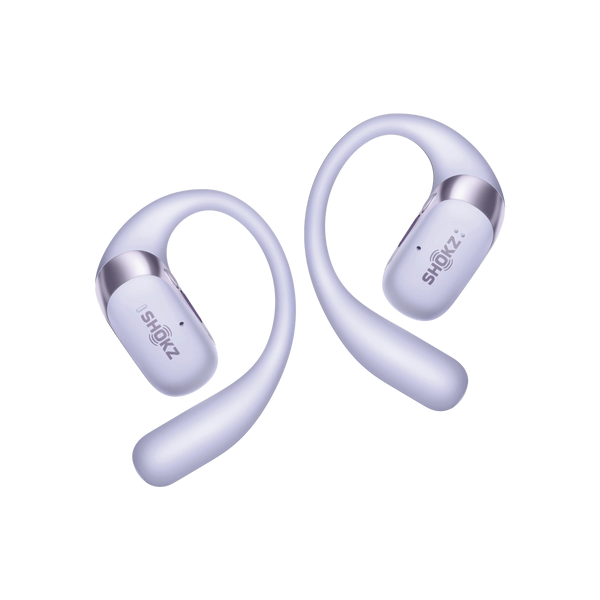
Key Features of OpenFit 2+:
-
DualBoost™ Processing: Enhances audio presence without cranking the volume, providing clearer and fuller sound at lower levels.
-
Dolby Audio: Adds dimensional depth, making sound feel larger and cleaner, improving quality without increasing volume.
-
Multipoint Pairing: Provides stable output when switching between devices, preventing audio dropouts and ensuring seamless listening.
FAQ
1. What volume should headphones be?
It’s generally recommended to listen at around 60% of maximum volume to reduce the risk of hearing damage, especially during longer listening sessions.
2. Is listening to music at 100 dB bad?
Yes, prolonged exposure to sounds at 100 dB (similar to a chainsaw or loud music at max volume) can cause hearing damage. Keep the volume below 85 dB to protect your hearing.
3. How loud can the loudest open-ear headphones get?
Open-ear headphones can reach volumes similar to traditional headphones, but their design is meant to allow ambient sound, so they may feel quieter at higher volumes. However, the loudness will depend on the model and the source device.
4. Do headphones lose volume over time?
Yes, as headphones age, their internal components may wear out, leading to lower sound output. Cleaning the speakers and checking the connections may help, but if the issue persists, it could be due to aging components.
Conclusion
Making Bluetooth headphones louder is possible with a few simple adjustments. Whether it's cleaning the speakers, adjusting the audio settings, or ensuring your devices are compatible, these steps can help improve volume. Remember, though, to always protect your hearing by managing listening time and volume levels. With the right approach, you can enjoy a fuller, safer audio experience without compromising sound quality or ear health.