Why Do My Bluetooth Headphones Keep Cutting Out All the Time?

Ever been in the middle of a workout, commute, or important conference call when your Bluetooth headphones suddenly cut out? It’s frustrating and can make a device feel completely unreliable. Dropped audio isn’t just annoying—it breaks focus, interrupts your flow, and can ruin the listening experience. This guide will explain the common causes of Bluetooth dropouts and show practical ways to fix them for a smooth, stable wireless experience.
What Causes Bluetooth Headphones to Cut Out
Bluetooth audio issues usually come down to signal stability, interference, or the source device itself. Understanding the root cause makes troubleshooting much easier.
1. Physical Distance and Obstructions That Weaken the Signal
Bluetooth works best within a limited range, typically around 30 feet (10 meters). Walls, desks, gym equipment, or even keeping your phone in a pocket or backpack can weaken the signal. As the connection struggles to pass through obstacles, audio may stutter or drop entirely.
2. Weak Bluetooth Signal Between Headphones and Device
Even without obvious obstacles, a weak or unstable signal can cause interruptions. This often happens in crowded wireless environments—like offices, apartments, or public transport—where many Bluetooth and Wi-Fi signals compete for space.
3. Issues With the Audio Source Itself
The problem isn’t always the headphones. Phones, laptops, or tablets with low battery, outdated software, or overloaded processors can struggle to maintain a stable Bluetooth connection. Streaming high-bitrate audio or running many apps at once can also stress the connection.
How to Fix Your Bluetooth Headphones From Cutting Out
Once you know what’s causing the issue, most Bluetooth dropouts are easy to fix with a few quick adjustments.
1. Check for Physical Obstructions and Range Issues
Start simple. Keep your headphones and device as close as possible, ideally within direct line of sight. Avoid thick walls, metal objects, or keeping your phone buried in a bag or pocket during use.
2. Refresh the Connection via “Forget Device”
If dropouts keep happening, reset the connection:
-
Go to your Bluetooth settings
-
Select your headphones
-
Tap “Forget” or “Remove”
-
Pair them again from scratch
This clears old connection data that can cause instability over time.
3. Disable Competing Bluetooth Devices
Multiple active Bluetooth connections can interfere with each other. Turn off Bluetooth on devices you’re not using—such as smartwatches, tablets, or secondary phones—to reduce signal congestion and improve stability.
4. Adjust Audio Codecs for Better Stability
Some devices allow you to choose which Bluetooth audio codec to use. Higher-quality codecs often handle interference and movement better, while basic codecs may struggle in busy environments.
If your device supports it, switching to a more stable codec can significantly reduce audio dropouts, especially when you’re moving or surrounded by other wireless signals.
5. Update Your Firmware and Hardware Drivers
Outdated firmware or drivers are a common cause of connection issues. Check for updates on:
-
Your headphones
-
Your phone, tablet, or computer
-
Bluetooth or audio drivers (on laptops and PCs)
Manufacturers frequently release updates that improve connection stability and fix known bugs.
Tips to Prevent Future Bluetooth Dropouts
Preventing Bluetooth issues often comes down to good habits and choosing devices designed for stable performance.
1. Keep Your Devices Fully Charged to Avoid Dropouts
Low battery levels can weaken Bluetooth signal strength. Some wireless headphones automatically reduce performance to save power, which can lead to frequent cutouts. Keeping both your headphones and source device charged helps maintain a consistent connection.
2. Disable Unnecessary Bluetooth Connections
Even when not actively in use, paired devices can compete for signal priority. Turning off unused Bluetooth connections reduces interference and helps your headphones maintain a stronger, more reliable link.
3. Choose High-Quality Bluetooth Codecs
Frequent Bluetooth dropouts aren’t always caused by your phone or environment. The real culprit is often Bluetooth codecs and transmission stability. Low-quality or outdated codecs can fail under minor interference, causing stuttering, latency, or sudden cutouts. This makes high-quality transmission technology crucial for uninterrupted playback and consistent audio.
With Shokz open ear headphones like the OpenFit 2+, this technology ensures stable, uninterrupted audio in real-world use. Powered by DualBoost and DirectPitch 2.0™, they optimize signal handling and acoustic performance. Combined with Dolby Audio, the result is clearer, more consistent sound even in complex wireless environments, effectively reducing interruptions.
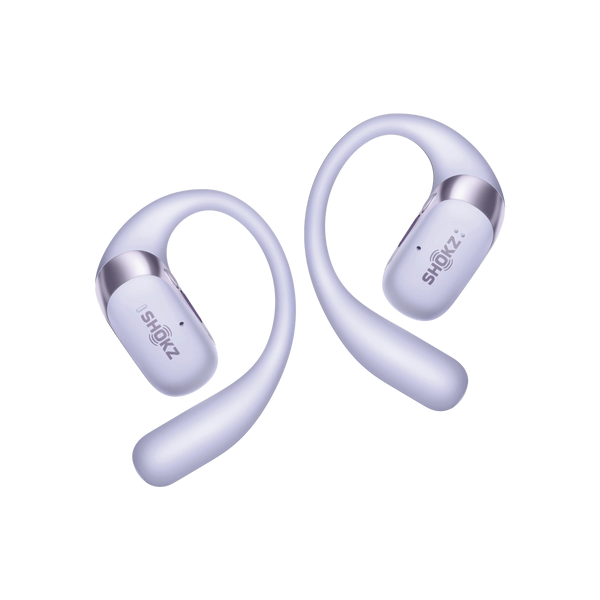
Why OpenFit 2+ Keeps Your Bluetooth Stable
-
Connect to two devices for uninterrupted multi-point use.
-
Up to 11-hour battery prevents low-power dropouts.
-
Physical buttons help maintain continuous audio without false dropouts.
4. Avoid Frequent Switching Between Multiple Paired Devices
Constantly switching your headphones between phones, laptops, and tablets can confuse Bluetooth pairing priorities. When possible, disconnect before switching devices, or stick to one primary source to keep the connection stable.
FAQ
1. How can I make my Bluetooth connection stronger?
Keeping devices close together is the simplest solution. Reducing physical barriers, turning off unused Bluetooth devices, and updating firmware or drivers can further improve stability. Some headphones also allow adjusting settings to prioritize connection over audio quality, which helps in challenging environments.
2. Does Bluetooth signal go through walls?
Yes, but walls, especially thick or metal-reinforced ones, weaken the signal. Each obstacle adds resistance, which can cause stuttering or dropped audio. Open spaces provide the best performance.
3. How far away can Bluetooth headphones work?
The typical Bluetooth range is around 30 feet (10 meters), but it varies depending on the environment and device. Open spaces allow longer distances, while areas crowded with wireless signals can shorten the effective range.
4. Why does my audio cut out every few seconds?
Frequent dropouts usually stem from interference, weak signal, low battery, or outdated software. Streaming high-bitrate audio or moving through areas with many wireless devices can also stress the connection and make audio unstable.
Conclusion
Bluetooth audio dropouts are frustrating, but they’re often easy to fix. Common causes like weak signals, interference, and low battery can be addressed with a few simple adjustments. Keeping devices updated, staying within range, and choosing headphones with optimized codecs can help ensure a stable connection. By following these tips, you can enjoy a seamless wireless audio experience without the interruptions.