How to Reset Your Headphones: A Step-by-Step Guide

Bluetooth headphones and earbuds are meant to make life easier, but when connection drops, pairing fails, or controls become unresponsive, they can quickly become a headache. If you’re dealing with frequent dropouts, pairing problems, or unresponsive controls, a reset can often be the solution.In this guide, we’ll walk you through when to reset your headphones and the step-by-step process to do it, ensuring they work at their best.
When to Reset Your Earbuds or Headphones
Resetting your headphones is a straightforward way to resolve issues without needing technical expertise. But how do you know when it’s time to reset? Here are a few signs that it might be time to hit the reset button.
1. Frequent Connection Drops or Audio Cutouts
If your wireless headphones often lose connection or cut out while you’re listening to music or on a call, a reset can help restore the stability of your connection.
2. Headphones Won’t Pair Properly
Struggling to pair your headphones with your device? Whether it’s a one-time glitch or an ongoing issue, resetting can usually fix pairing problems by clearing out any connection errors.
3. Touch or Button Controls Don’t Work
When the touch or button controls on your headphones stop responding, it might be a software glitch that a reset can solve.
Step-by-Step Guide to Reset Earbuds
If you’re dealing with any of the issues mentioned above, it’s time to reset your earbuds. Here’s a step-by-step guide to help you reset them, whether you have a case button or not.
1. Reset Earbuds via Case Button
If your earbuds have a case button, the reset process is simple. Follow these steps:
-
Open your Bluetooth settings on your device.
-
Find your earbuds in the list of paired devices.
-
Hit “Forget This Device” to remove the connection.
-
Place the earbuds back in the case.
-
Hold the case button for 10–15 seconds to reset the earbuds.
-
Reconnect your earbuds by pairing them with your device again.
2. Reset Earbuds Without A Case Button
Not all earbuds come with a case button, but you can still reset them manually. Here’s how:
-
Open Bluetooth settings on your device.
-
Tap your earbuds' name in the list of paired devices.
-
Select “Forget This Device” to remove the connection.
-
Hold the power button on the earbuds until the LED blinks (usually around 10 seconds).
-
Re-pair from scratch by connecting them again to your device.
Can Resetting Earbuds Fix Hardware-Related Issues?
Resetting your earbuds is a good first step when something feels “off.” It often clears up connection glitches or small software hiccups. But it’s also worth knowing where resetting helps—and where it doesn’t.
1. Resetting Earbuds Effectively Resolves Most Software Issues
Most of the time, a reset fixes problems caused by software. Things like unstable Bluetooth connections, delayed controls, or earbuds not pairing properly are usually tied to temporary system errors. Resetting clears old pairing data and gives the earbuds a clean start, which is often enough to get everything working normally again.
If your earbuds are in good physical condition, this step alone can save you a lot of time and frustration.
2. Physical Hardware Damage Cannot Be Fixed
If your earbuds have suffered physical damage—like drops, water exposure, or worn-out parts—resetting won’t help. These issues can still affect sound, connection stability, or battery life no matter how many times you try. In such cases, simply resetting isn’t enough, and using damaged earbuds may only cause more frustration. Replacing them is often faster and more reliable.
For a reliable replacement that stands up to daily use, Shokz open ear headphones like OpenFit 2+ are a strong option. Its open-ear design and thoughtful build help reduce discomfort or damage while keeping pairing simple and consistent.
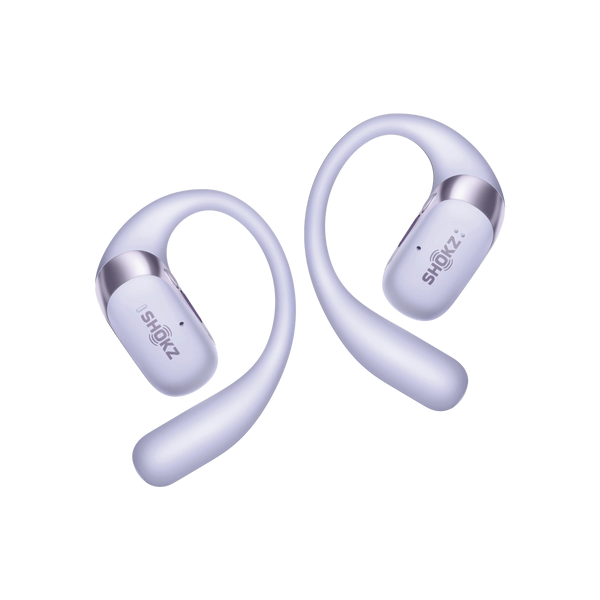
Here’s what makes OpenFit 2+ a practical choice:
-
Bluetooth 5.4 Stability: Faster, more stable pairing with fewer dropouts—perfect if you often switch between phone, laptop, and other devices.
-
Physical Button Controls: Buttons respond reliably even when you’re moving or your hands are damp, avoiding the frustration of swipe gestures.
-
Dolby Audio Enhancement: Clearer vocals and more texture ensure speech doesn’t get lost in background noise.
-
Long Battery Support: Up to 11 hours of playtime lets you get through a full day without recharging.
3. Persistent Earbud Issues Require Professional Technical Support
If problems keep coming back even after multiple resets, it may be a deeper hardware or firmware issue. At that point, it’s best to check your warranty or reach out to the manufacturer’s support team to see whether repair or replacement is available.
FAQ
1. Will Resetting the Earbuds Erase All the Settings?
Resetting your earbuds will remove paired device information and clear any temporary glitches, but it generally does not erase custom settings like equalizer presets. However, it’s always a good idea to check the manufacturer’s instructions.
2. Is It Normal for Earbuds to Reset Themselves?
Some earbuds may automatically reset after certain updates or if there’s a software issue. If this happens frequently, it might be worth checking for firmware updates or contacting customer support.
3. How Often Should I Reset My Wireless Earbuds?
Resetting your earbuds is generally only necessary when you’re experiencing specific issues, like connectivity drops or pairing problems. Frequent resets may indicate a deeper issue with the earbuds or the connected device.
4. Can Resetting Earbuds Too Often Cause Any Damage?
Resetting won’t harm your earbuds, but doing it too often usually isn’t needed. Frequent resets can signal firmware or pairing issues. If it happens a lot, check for updates or try a different device to see where the problem lies.
5. Why Do My Earbuds Only Reset One Side?
This happens when one earbud loses sync. Usually caused by uneven battery, interrupted pairing, or misplacing one earbud in the case. Make sure both are charged, reset together, and re-pair as a single device.
Conclusion
Bluetooth earbuds can sometimes encounter issues that disrupt the listening experience, but a reset is often all it takes to get them back on track. Whether it's fixing connection drops, resolving pairing problems, or restoring unresponsive controls, this simple solution can help you maximize your earbuds' performance. By understanding when and how to reset, you ensure a better, more reliable audio experience, free from frustrating interruptions.