How Can I Reduce Wind Noise While Cycling?

A lot of riders don’t begin with a search for headphones. They begin with a pattern. The same route can feel completely different depending on speed, weather, and posture, and the audio setup that seemed perfectly fine on a calm commute can become difficult to hear on a faster ride. That shift is why cyclists may start looking into open-ear audio solutions, in-ear options for cycling, and simple wind-blocking accessories instead of just turning the volume up again.
Wind noise while cycling usually isn’t one gear problem. It can become noticeable when airflow reaches the ear, the microphone, or the space around a helmet strap in ways that change with speed, wind direction, riding position, and equipment. For riders trying to hear music, navigation, or calls without fully blocking outside sound, the question quickly moves from Why is this happening? to What can I adjust?
Why Wind Noise Changes With Speed and Position
Why it can become more noticeable around 30 km/h and above
A familiar pattern emerges at speed. Audio may feel manageable at a lower pace, then become harder to hear as the ride gets faster. One rider put it plainly: “And above ~30km/h, even with the volume on maximum it’s hard to hear anything over the wind noise.”
The 30 km/h range can be a noticeable point for some riders, but it is not a fixed wind-noise threshold. Relative wind speed, wind direction, riding position, head position, helmet shape, and headphone placement can all change the experience. For open-ear listening, the ear canal is not physically sealed, so stronger airflow can remain part of the listening environment and compete with music, speech, or navigation prompts.
This is often when the problem shifts from volume to airflow and equipment placement.
How descents, headwinds, and turning corners change what you hear
Wind noise can change quickly during a ride. A descent or headwind can turn a listenable setup into a wall of rushing air, while a corner can shift airflow from one side of the helmet or face to the other. A sheltered road, exposed bridge, and downhill section can all create different listening conditions within minutes.
Why wind can drown out audio even when volume already feels too high
More volume does not necessarily restore clarity. If rushing wind overlaps with speech or music detail, turning it up can make the audio feel harsh while still leaving parts of a podcast or navigation prompt difficult to hear.
The issue is not only output level, but the combination of changing airflow, ear exposure, and the type and placement of the listening device.
When Your Normal Setup Stops Working
How exposed ears and headphone placement create more rushing noise
Small changes in fit can change how much wind reaches the ear. Helmet straps, headphone position, and even a slight change in head angle can affect airflow.
This can become more noticeable on a bike than during walking or running. Shokz, for example, may feel light and easy to forget during a run, while the same open-ear design can be more affected by wind as cycling speed increases. That does not make open-ear headphones unsuitable for cycling; the experience depends on speed, conditions, and the rest of the setup.
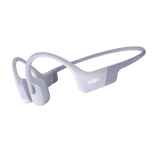
For lower-speed commuting or steady urban riding, open-ear models such as OpenRun or OpenRun Pro 2 are one option for riders who prefer not to seal the ear canal.
Try these adjustments:
-
Check whether helmet straps press close to the headphone or ear area.
-
Reposition the headphones if they sit directly in the strongest airflow.
-
Adjust your head position slightly and check whether the wind changes.
Why ANC and transparency mode can change how cycling wind noise is perceived
Listening modes can also affect how wind sounds. ANC and transparency mode respond differently depending on microphone placement, processing, device design, and riding conditions. One rider described disabling ANC because wind noise seemed worse with it on.
Strong airflow can affect external microphone pickup and, depending on the device, make wind more noticeable rather than less. There is no universal result, so testing the same setup with each mode on and off can be useful, especially on exposed or windy routes.
Try these adjustments:
-
Compare ANC on and off in the same riding conditions.
-
Test transparency mode separately if available.
-
Recheck the setting when moving between sheltered and exposed sections.
How inconsistent terrain leads to constant volume adjustments
A quiet road may make your current volume feel too high, while a descent or exposed turn suddenly makes the audio harder to hear. Repeatedly reaching for the controls can be a sign that volume is not the only issue.
Instead of simply turning the audio up, check fit, airflow, listening mode, and device placement. These factors can help explain why the same volume feels so different from one part of a ride to another.
What Cyclists Search for Next When Basic Tweaks Fail
Looking for ear covers, buffs, and helmet add-ons that block direct airflow
The first practical search is often not for a new audio device. It’s for something that blocks wind before it reaches the ear. Thin headbands, buffs pulled over the ears, winter ear covers, and small helmet-mounted deflectors can reduce direct airflow without changing the audio source.
This can be a relatively simple fix. If the main issue is wind reaching exposed ears, a fabric layer may soften the rushing sound enough to make existing gear easier to use.
Comparing in-ear, open-ear, and bone-conduction options for windy rides
If airflow blockers don’t solve it, the next step is often a design comparison. In-ear models handle wind differently because a secure seal can reduce how much outside airflow directly affects perceived audio. Open-ear and bone-conduction headphones leave the ear canal unsealed, so wind remains part of the listening environment.
That tradeoff is one reason Shokz may come up in searches for cycling audio. Riders who do not want an in-ear seal may consider bone-conduction or other open-ear designs for navigation or background audio. The limitation is that stronger airflow can still compete with the audio, particularly on exposed or faster sections of a ride.
Deciding whether fit, tips, or ear sealing matter more than louder volume
Once riders compare designs, the question becomes more precise: is the answer louder output, or better fit and sealing? In some setups, fit makes the larger difference. As one rider said, “I’ve a good fit with silicone tips and they kill a lot of wind noise.”
That doesn’t mean every cyclist should switch to sealed earbuds. It means wind control can come from managing airflow at the ear rather than pushing more volume into a setup that isn’t working well.
Which Gear Helps Reduce Wind Noise While Cycling
How ear covers, headbands, and buffs can reduce direct wind at the ear
These accessories work by interrupting some of the direct airflow before it reaches the ear canal or the skin around it. Often, a thin layer is enough to soften the rushing sound. For riders using open-ear audio, that may make navigation prompts or music easier to hear in certain conditions.
They also work well as a first step because they don’t require a full gear change.
How in-ear designs with a secure seal handle wind differently from open-ear listening
A sealed in-ear fit can provide more isolation from external airflow when the tip stays securely seated. That can make music detail, spoken directions, and calls easier to hear in windy conditions.
The tradeoff is that the ear canal is physically sealed. Riders who don’t want that type of fit may continue looking for an open-ear alternative rather than treating in-ear as the automatic answer.
How bone-conduction headphones fit into a low-to-moderate speed setup
Bone-conduction headphones change how audio is delivered, but they do not eliminate wind noise. Strong airflow can still affect what the rider hears, particularly when the route is exposed or speeds increase.
That is why bone-conduction designs can make sense for riders who prefer not to seal the ear canal and want audio present during commuting, city riding, or moderate-speed routes.
Where they may be easier to use is on a ride where you want audio present without relying on a sealed earbud. On a fast descent or exposed headwind, direct airflow can become the louder part of the listening environment.
When microphone covers and wind-filtering features help on rides and calls
Calls are a separate issue, because now the problem is not only what you hear, but what the other person hears. Wind hitting the microphone can make speech harder to understand even in a mild breeze. Wind-filtering features and microphone placement can help, and on some devices that may be enough for slower rides or short check-in calls.
If calls matter more than music, microphone performance becomes an important part of the setup rather than a secondary feature.
How to Choose an Audio Setup for Cycling
A practical fit for riders who want clearer audio at moderate speeds
For moderate-speed rides, some cyclists may prefer an audio setup that does not seal the ear canal and stays in place as they ride. Shokz OpenRun and OpenRun Pro 2 use an open-ear design with an ear-hook and neckband structure, keeping the listening hardware positioned around rather than inside the ear. This can make them a practical option for commuters and riders on steady urban routes, although wind, helmet fit, and riding position can still affect how clearly audio comes through.
A practical fit for riders who take calls and need better microphone wind control
If calls are part of the ride, microphone handling matters as much as what reaches your ears. Riders in this group may benefit from slower-speed use, sheltered routes, or setups with wind-filtering features. If the route is consistently windy, limiting calls to calmer sections may be more practical than expecting the same microphone performance in every condition.
Comparing bone-conduction headphones with in-ear earbuds
This choice usually comes down to how the rider wants to manage wind and ear coverage. In-ear designs can reduce the effect of airflow when sealed well. Bone-conduction headphones leave the ear canal unsealed but do not remove wind from the listening environment.
The right choice depends less on brand and more on the type of ride: a fast, exposed effort presents different audio conditions from a moderate-speed trip on sheltered roads.
How Riders Validate a Fix Before Committing to New Gear
Testing your setup by speed, route type, and wind direction
The useful test is not indoors, and not on one calm block. Riders can learn more by checking the same setup on a sheltered section, an exposed straight, and one descent. Testing different wind directions and head positions can also show whether the problem is constant or appears only under specific conditions.
Checking whether disabling ANC or transparency improves results
Before buying anything, it makes sense to turn off ANC or transparency and repeat the ride. If the rushing sound changes noticeably, the listening mode may be contributing to the experience rather than the hardware itself being the only factor.
Knowing when to pause audio on fast descents instead of forcing more volume
Sometimes the practical response is not another accessory. It’s recognizing when conditions have changed too much. One rider described a simple version of that: on a descent at 70+ kph, they pause audio until speeds come down.
That kind of adjustment is useful because wind, route exposure, speed, and equipment can change from one section of a ride to another. Testing those variables can help you settle on a setup that matches the type of riding you do most often.
Wind noise while cycling is usually easier to manage by controlling airflow where possible, choosing a listening design that fits your preferences, adjusting listening modes when needed, and knowing when conditions are too noisy to keep forcing more volume.