How to Drain Water from Swimming Headphones After a Swim

Have you ever finished a swim only to realize your headphones are muffled, or worse, completely silent? It’s a frustrating experience that often leaves you wondering if your gear is ruined for good. Knowing exactly how to drain water from swimming headphones is the difference between a quick fix and a costly replacement.
In this guide, we’ll show you how to rescue your device using practical, step-by-step drying methods tailored to the level of moisture inside. Beyond immediate fixes, we’ll also cover essential habits to prevent water ingress and protect your gear, ensuring your headphones keep running lap after lap.
How to Drain Water from Swimming Headphones by Damage Level
Quick Read
- Mild Damage: Shake gently and play a low-frequency "water eject" sound to vibrate moisture out of the speakers.
- Moderate Damage: Flick your wrist firmly to expel water using centrifugal force, then place them in a sealed container alongside silica gel packets for 24-48 hours.
- Severe or Saltwater Damage: Lightly rinse with fresh water to wash away corrosive salt/chemicals, followed by gentle vacuum suction on the ports.
Taking the right approach depends heavily on how much water is actually trapped inside. Here is a breakdown of the most reliable methods to dry your gear, categorized by the severity of the moisture.
Mild Water Damage: Gravity and Sound Waves
If your headphones sound a bit muffled and only have surface-level water, simple gravity paired with sound waves usually does the trick:
-
Step 1: Shake & Drain: Gently shake off visible water, then lay the headphones on a dry paper towel with the speaker mesh facing down so gravity can pull the moisture out.
-
Step 2: Eject with Sound: To clear the remaining stubborn drops, use a specific sound to remove water from earphones. Play a water-ejecting tone or a low-frequency bass track at a moderately high volume. The vibrations will push trapped water out of the crevices without needing to pry anything apart.
Tips:You can easily find "water eject sound" videos on YouTube, which use specific low frequencies like 165Hz to vibrate water out.
Moderate Water Damage: Centrifugal Force and Silica Gel
When the volume drops noticeably and water seems lodged deeper in the gaps, you'll need more than just gravity:
-
Step 1: Flick & Shake: Firmly grasp the headphones and briskly flick your wrist to force the water out using centrifugal force. Just hold on tight so you don't throw them!
-
Step 2: Seal with Silica Gel: Place the headphones in a sealed container with dust-free silica gel packets. Let them sit for 24 to 48 hours to effectively draw out any lingering internal moisture without introducing debris.
Severe or Saltwater Damage: Freshwater Rinse and Vacuum Suction
If the buttons are unresponsive or your headphones took a plunge in saltwater, act fast to prevent internal corrosion:
-
Step 1: Freshwater Rinse: Lightly run the headphones under clean, fresh water. It sounds counterintuitive, but this washes away corrosive salt and pool chemicals before they dry. Don't shake them violently afterward, as that just forces water deeper inside.
-
Step 2: Gentle Suction: Grab a vacuum with a narrow nozzle attachment to carefully pull moisture out of the charging ports and button seams. Hover the nozzle slightly above the device so the suction isn't too strong, then leave them in a well-ventilated spot to completely air dry.
How to Protect Swimming Headphones from Water Damage
Rescuing wet headphones is only the first step. Preventing water damage altogether is what truly extends your gear's lifespan. Here are a few simple habits to keep your headphones safe:
Dry Immediately After Swimming
Make it a habit to wipe down your headphones with a soft, absorbent cloth the second you get out of the pool. Removing that initial bulk of water right away helps prevent moisture from slowly seeping into the charging pins and internal seals while they sit in your gym bag.
Clean Earwax and Water Minerals Regularly
Over time, earwax, pool chemicals, and hard water minerals can build up on the surfaces of your device. This buildup can block the speaker meshes and slowly degrade the waterproof seals. Gently brushing the meshes with a dry, soft-bristled toothbrush and wiping the body with a damp cloth keeps the audio clear and helps maintain the structural integrity of the waterproofing.
Upgrade to Truly Waterproof Headphones
If you've tried the preventative steps above but still find yourself constantly battling moisture issues, it might be time to consider upgrading your gear. Switching to a high-quality device built specifically for the water can save you a lot of hassle and give you peace of mind.
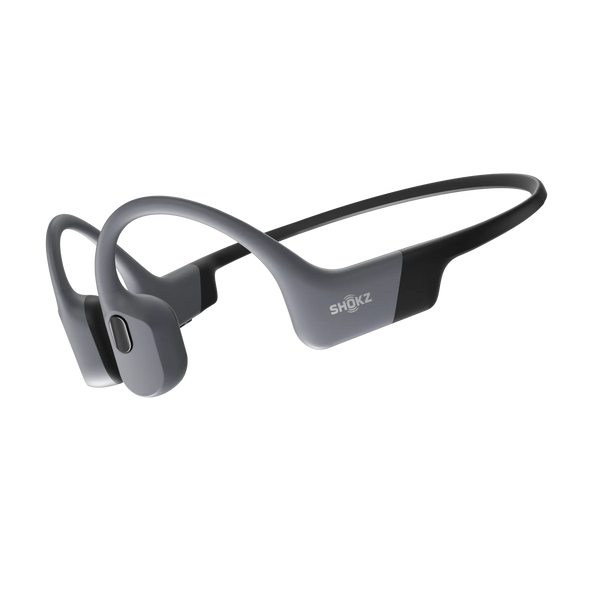
The Shokz OpenSwim Pro is a waterproof headphone built for swimming, featuring an IP68 rating that allows submersion in up to two meters of fresh water. Its primary waterproof advantage is bone conduction technology, which eliminates the open speaker meshes where water typically leaks into standard earbuds. Additionally, its silicone exterior provides a durable barrier against the corrosive effects of chlorine, salt, and sweat, maintaining the hardware's integrity over time.
FAQ
Q1: Can I use a hair dryer to dry my water-damaged swimming headphones?
A: It is generally not recommended to use a hair dryer, especially on a heat setting. High heat can easily melt the waterproof glues and warp the delicate internal diaphragms. If you feel you must use one, strictly stick to the cool air setting and hold it a safe distance away.
Q2: If I’ve dropped wireless earbuds in water, how to fix them, and is it safe to charge them right away?
A: No, it is not safe—charging while moisture is trapped inside can cause a short circuit; the best way to fix the device is to wait at least 24 hours to ensure the internal components and charging ports are completely dry. Plugging in too early may permanently ruin the hardware or create a safety hazard.
Q3: Why is the volume still low after I finish draining my water damaged headphones?
A: Low volume usually means there is still a thin film of water trapped against the speaker mesh, or debris like earwax and dried chlorine is blocking the sound path. If you've given them ample time to dry out, try gently cleaning the exterior mesh to see if that restores the audio quality.
Q4: How do I clean water out of in-ear swimming headphones?
A: For in-ear models, always remove the silicone ear tips first. Shake the earbuds gently, then place them mesh-side down on an absorbent towel. Using a sealed box with silica gel desiccants is highly recommended for in-ear styles, as their internal components are very compact and hard to air out naturally.
Q5: Can I put my water damaged headphones in rice to dry them out?
A: While it's a well-known trick, rice isn't the best option for modern electronics. Rice dust and small grains can easily get lodged in the headphone ports, button seams, and speaker grills, causing more harm than good. Silica gel packets are a much safer and more effective alternative.
Conclusion
A waterlogged pair of headphones isn't necessarily a lost cause. By assessing the moisture level and using the right drying techniques, you can effectively revive water damaged headphones. However, consistent maintenance and starting with the right gear are your best defenses in the long run.If you're tired of constantly battling trapped water, it might be time to explore the reliable, high-performance waterproof options available at the Shokz official website.