Do Clip-on Earbuds Cause Left-Right Audio Imbalance in Real Use?
We've noticed a recurring question here at Shokz: do clip-on earbuds tend to develop left-right audio imbalance? Whether you're working at your desk, walking, or hitting the gym, you might suddenly notice one side sounding quieter, thinner, or slightly muffled. This imbalance often fluctuates with movement, leaving many wondering if their earbuds are faulty or just need adjusting.
Uneven audio isn't uncommon, but it's often a matter of fit rather than a hardware defect. Let's explore why open-ear designs are particularly sensitive to placement, and how to tell a quick adjustment from a genuine issue.
Can Clip-On Earbuds Sound Uneven in Normal Use?
Clip-on earbuds can indeed sound uneven in real life, even when both sides are functioning perfectly. Whether you are sitting at a desk, taking a walk, or mid-workout, the audio balance depends heavily on how each earbud rests against your ear at any given moment.
Why Clip-On Earbuds Can Sound Louder, Thinner, or Farther Away on One Side
User feedback frequently highlights this shift. As one customer shared with us: “The right one suddenly sounded like it’s under water and quieter than the left one.” While this feels like an instant hardware failure, it typically points to a change in acoustic positioning.
With the sound path exposed, if one side sits just a fraction higher, further forward, or less securely, it can lose its fullness. Instead of a centered stereo image, the audio naturally pulls to one side.
Why the Problem Can Seem Intermittent Instead of Constant
This inconsistency often happens because the trigger is simply everyday movement. A slight head turn, jaw motion, posture shift, or the natural bounce of a jog can alter how the earbud sits. The imbalance might show up during an activity, only to fade away once you readjust or sit still. If your audio fluctuates while moving but centers out when you stop, the physical fit is the first thing to check.
What “Common” Looks Like vs. What Sounds Like a True Failure
A typical positioning quirk involves a mild volume shift that improves when you nudge the earbud. In contrast, a genuine warning sign is persistent, one-sided distortion that doesn't go away after adjusting the fit, resetting settings, or swapping devices. For instance, a user recently noted that after ten weeks of use, their left earbud began producing harsh distortion specifically on bass-heavy tracks. If one side consistently distorts on specific frequencies while the other is fine, it strongly suggests a hardware defect rather than a simple placement issue.
How the Clip-On Design Creates Imbalance Risk That In-Ear Earbuds Can Hide
The clip-on design itself is the core variable. Unlike in-ear earbuds, clip-on models do not rely on a canal seal. This characteristic of open-ear headphones can feel lighter and more natural, but it also means the sound is more sensitive to exact position.
Small Placement Changes Create Bigger Perceived Balance Changes
Without an acoustic seal trapping the audio, tiny angle differences matter significantly. If your left earbud sits just a millimeter closer to the ear canal opening than the right, that side will easily sound fuller. In-ear monitors largely hide these minor fit discrepancies because the trapped air pressure stabilizes the sound. Clip-on earbuds simply don't have that built-in buffering effect.
Movement During Walking, Jogging, or Head Turns Can Change the Stereo Image
Because open-ear designs lack that stabilizing canal seal, dynamic movements impact their stereo image more noticeably. Walking or quick head turns can subtly shift the firing angle of the speaker. Music that felt perfectly centered might suddenly lean to one side, not necessarily because the earbud is loose, but because the unsealed sound path shifted just enough to be audible.
Why Clip-On Earbuds May Feel Fine Physically but Still Sound Off Acoustically
Another fundamental difference from in-ear models is that physical comfort doesn't guarantee acoustic alignment. An in-ear tip usually sounds right as soon as it feels snug. With a clip-on, the earbud can feel completely secure and painless on your cartilage, yet still sit at a less-than-ideal angle to deliver a balanced stereo center. Sound symmetry requires its own specific adjustment.
How to Fix Clip-On Earbuds Fit When One Side Sounds Off
This is the most useful self-check: adjust fit before changing settings or assuming a defect.
Reposition the Quieter Side First Before Changing Any Settings
Start with the side that sounds quieter, thinner, or farther away. Make small changes to height, angle, and contact point. Move it slightly up or down. Rotate it a little forward or back. Then replay the same audio.
The goal is not a dramatic shift. Often, a very small reposition is enough to bring the stereo image back to center.
Check Whether Your Ears Hold Each Side Differently
Most ears are not perfectly symmetrical, and clip-on earbuds can reveal that quickly. One ear may support a slightly tighter hold, while the other lets the earbud sit farther from the ideal listening position.
A practical test is to look in a mirror and compare how each side sits. If one earbud appears higher, farther out, or angled differently, that may explain the imbalance.
As a general note, if discomfort, pressure, or ongoing irritation appears while adjusting fit, stop using the earbuds and consult a qualified professional if needed. Comfort and safe wear should come first.
Test While Sitting Still, Then While Walking
Do a two-part test with the same song or spoken-word track. First, sit still and listen for centered sound. Then stand up and walk for a minute. If the imbalance appears mainly during movement, the issue is likely fit stability rather than software or driver failure.
This simple comparison helps separate a constant issue from a movement-triggered one.
Swap Sides If Your Model Supports Interchangeable Left and Right Earbuds
Some clip-on designs support interchangeable left and right use. If your model allows that, swap sides and test again. If the problem follows the earbud, the earbud may be the issue. If the problem stays with the same ear, your ear shape or positioning is more likely the cause.
For users who wear one side at a time, this can also be a helpful way to learn which orientation gives the most balanced result.
Before You Blame the Earbuds, Rule Out Device and App Causes
Fit is a major cause of clip-on earbuds audio imbalance, but software issues are easy to miss and quick to check.
Check the Left-Right Balance Slider in Accessibility Settings
This is one of the most overlooked causes. Phones, tablets, and computers often include a left-right audio balance slider in accessibility settings. If it has shifted even slightly, one side will sound consistently louder.
Check that first before going deeper.
Turn Off EQ, Mono Audio, Hearing Adjustments, and App-Specific Sound Effects
Next, disable any sound processing that can alter channel balance or tonal weight. That includes EQ presets, mono audio, hearing adjustments, spatial effects, and app-specific sound enhancements.
If your earbuds work with the Shokz App, return EQ settings to a neutral preset during testing. Once balance is restored, you can re-enable preferred sound settings one by one.
Try Another Device and Another Audio Source
Test the earbuds with a different phone, tablet, or laptop. Then try a different app or audio file. This helps separate earbud behavior from device behavior.
If the imbalance only happens on one device or one app, the earbuds may not be the root cause. If it happens everywhere, continue the fit and hardware checks.
What to Expect: Adjustment Periods vs. Hardware Defects
Ultimately, the real goal of troubleshooting isn't just to confirm the imbalance—it's to see what actually fixes it.
When Repositioning Solves the Problem Enough to Keep Using Clip-On Earbuds
Many users find that the audio vastly improves once they spend a few days building muscle memory for the optimal placement. Finding that specific "sweet spot" for your unique ear shape can require a brief adjustment period that first-time users might not anticipate.
When Repeated One-Sided Distortion Points to a Defective Unit
If one earbud repeatedly sounds distorted—especially evident on bass-heavy audio—and the issue persists after tweaking the fit, checking settings, and testing another device, it moves past normal placement quirks. A functioning clip-on earbud might shift in volume during a run, but it shouldn't consistently crackle or buzz on one side.
When Your Ear Shape Makes Clip-On Earbuds a Poor Long-Term Match
Occasionally, the hardware is flawless, but the physical match just isn't there. Some listeners love the sound profile but simply cannot achieve a reliable, balanced fit on one ear due to natural cartilage variations. In these instances, it isn't user error; it can just be a form-factor mismatch.
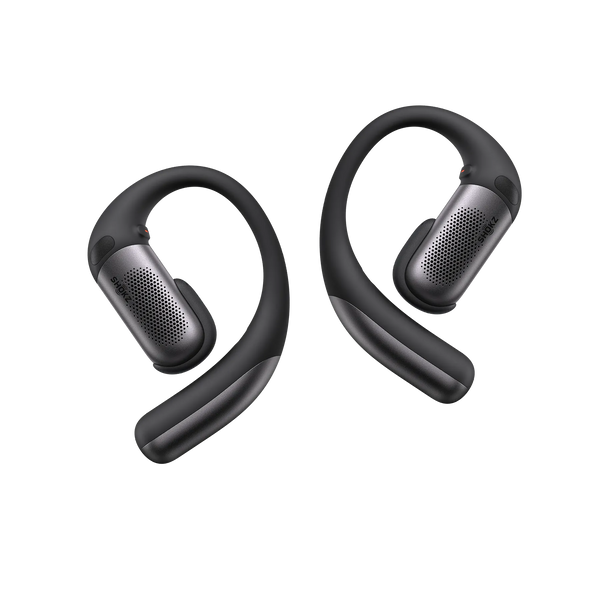
In these instances, switching to an ear-hook alternative like the Shokz OpenFit Pro can often help. Its flexible titanium-alloy hooks and soft silicone are designed to wrap gently over the ear instead of pinching it, offering a more stable, balanced listening experience for varying ear shapes.
Conclusion
Audio imbalance with clip-on earbuds is a real occurrence, but it isn't an automatic red flag for a broken device. The most effective approach is to follow a logical sequence: fine-tune your physical fit, compare still vs. moving environments, verify your device’s software settings, and test an alternate source. This routine typically uncovers the answer in minutes—often saving you the hassle of returning perfectly good earbuds.
But if you’ve ruled out fit and settings and that one-sided distortion refuses to fade, you are likely looking at a genuine hardware defect. At that point, exploring your warranty or replacement options is the best path forward.
Author Information

guides on Shokz
Related Posts