What Is EQ in Audio: How Equalizer Frequencies Shape Bass, Mids, and Highs

Have you ever wished your music had punchier bass or clearer vocals? The key to tailoring sound to your audio preference is the EQ, i.e. equalizer settings. Understanding what is EQ in audio is essential to unlock your audio system's full potential. EQ is the process of adjusting the balance of frequencies within an audio signal. In this article, we’ll explore how EQ works, why it makes such a difference, and also share a few simple ways to use it to make your favorite songs, podcasts, and movies sound exactly the way you like them.
What Is Equalization in Music?
To clearly explain what an equalizer is in audio, you need to understand EQ’s main function. An equalizer is an electronic tool that adjusts the balance of frequencies within an audio signal.
Definition of Equalization (EQ)
Equalization is a sophisticated form of tone control. It works by dividing the audible frequency range (20 Hz to 20,000 Hz) into smaller bands. Then the equalizer allows you to increase or decrease the level in each band. These adjustments will determine the character of the sound. They can highlight certain tones or soften others. The adjustments let you create the type of sounds you want. If you've ever wondered what a sound equalizer is, it's this specialized filter used to adjust sound frequencies.
Basic Parts of An Equalizer
Every equalizer, digital or physical, relies on these core components:
-
Frequency Bands: The entire audible range (20 Hz to 20,000 Hz) is segmented into bands (e.g., bass, mid-range, treble). Each band is centered around a specific frequency for adjustment.
-
Filters: These are the electronic or digital algorithms that modify the shape of the frequency curve to match the type of sound you want. The shapes can look like a bell, a sudden drop off or step changes.
-
Gain Control: It adjusts the level of each frequency band. It can boost (increase) or cut (decrease) the amplitude, typically measured in decibels (dB).
-
Q Factor (Quality Factor): An important control that defines the bandwidth of the filter. A high Q value means the adjustment is narrow and targeted. A low Q value means the bandwidth adjustment is wide and gentle.
-
Input and Output Levels: These controls are used to manage the sound volume entering and leaving the equalizer. This way the overall loudness can remain consistent. Balancing input and output prevents digital distortion, or clipping, after the frequency adjustments are made.
Types of EQ
EQs can be categorized by the shape of their frequency curve after adjustments.
-
Peak/Parametric/Bell Filters: These create a bell shape frequency curve around a single center frequency. They are very precise, and allow control over the frequency, gain, and Q factor (bandwidth).
-
High-Pass and Low-Pass Filters (HPF/LPF): These are filters that block signals above or below a set frequency. HPF cuts off low frequencies and is used to remove low, rumble noises. LPF cuts off high frequencies and is used to make sound warmer or more mysterious.
-
High Shelf and Low Shelf Filters: These adjust all frequencies above or below a target frequency. A High Shelf filter adds broad brightness to the entire high frequency range. A Low Shelf filter adds broad warmth and body to the entire bass range.
Practical Uses of EQ in Music and Audio
EQs are used for both corrective and creative purposes, and are fundamental to high-quality audio.
1. Balancing Instruments in A Mix
EQ ensures every instrument has its own range of sound. For example, if the bass guitar and kick drum sounds are clashing, an engineer might reduce the bass guitar at 150 Hz while boosting the kick drum at the same point. This is called "frequency carving" and can create sound clarity and separation.
2. Enhancing Vocals
EQ is essential for making vocals more pronounced. Reducing muddy frequencies (200-500 Hz) will remove the hollow, boxy sounds. If you boost vocal presence frequencies (2-5 kHz), this adds clarity and articulation to words. A gentle high-shelf boost adds brightness and lift to vocals.
3. Correcting Room or Recording Issues
EQ can remove specific unwanted noises, such as a constant low-frequency hum of a motor. EQ can also remove the annoying echoing sounds. EQ fixes these specific problems using a high-Q, or very narrow, filter and doesn’t change the overall tone of the music.
4. Creative Sound Shaping
EQ can create unique artistic effects using these techniques. For instance, it can dramatically change a voice to make it sound like it's coming from an old radio. Just cut off the highest and lowest frequencies and boost the mid-range to get the sound quality unpacked.
How EQ Improves Your Listening Experience?
EQ is the ultimate personalization tool to enhance your listening enjoyment.
Customized Sound
The best part about an equalizer is that you can personalize the sound. You can tailor the audio exactly to your unique hearing style, music genre, or listening environment. This flexibility means you don’t have to settle for a one-size-fits-all sound.
Many modern devices, including headphones, now support EQ to enable personalized sound settings. Some offer dedicated EQ presets that let users quickly switch to specific styles. They also bring fine-tuning according to preferences. This greatly enhances the overall audio experience. Shokz follows the same approach. Here are two of its models that feature multiple EQ modes and customizable settings to suit different listening needs.
OpenRun Pro 2
OpenRun Pro 2 is equipped with several amazing EQ customization features. There are 6 preset EQ modes, including Standard, Vocal, Classic, Bass Boost, Treble Boost, and Volume Boost. Users can also access two customizable EQ profiles for more specific sound tuning. The headphone utilizes bone conduction technology and has an open-ear design, great for outdoor activities. It provides custom listening for up to 12 hours, enough to last for your extended endurance training.

OpenFit 2+
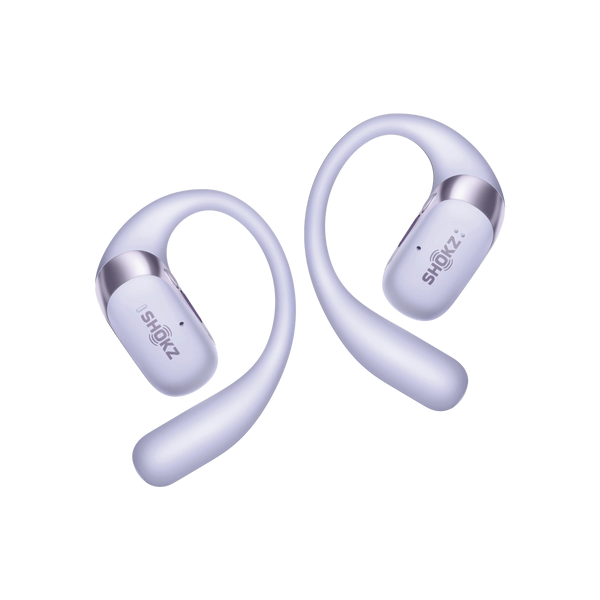
OpenFit 2+ has a built-in EQ that includes four preset modes (Standard, Vocal, Treble Boost, and Bass Boost) and two customizable modes. It is multi-purpose and features an open-ear design with a soft ear hook and is great for all-day comfort. OpenFit 2+ also gives you customized Dolby Audio sound quality for immersive listening. This earbud has up to 48 hours total battery life when used with the charging case, and supports wireless quick charging. It is part of the Shokz open ear headphones lineup.
Enhancing Soundstage and Space
EQ can influence your perception of the soundstage, i.e. the width and depth of sound. If you slightly boost the high frequencies, you create more "air," and make the sound feel less confined and more spacious.
Adapt to Different Music Genres
EQ allows you to adjust your audio to your specific music genres. Hip-hop needs a strong bass boost (60-100 Hz) for impact, while Classical music is best with a flatter response to preserve dynamics. An EQ can set the music the way it sounds best.
Tips for Using EQ for Optimal Sound Quality
A common guideline is to reduce a frequency range before boosting others. Too much boosting can increase the risk of sound distortion. Reducing unwanted frequencies is generally safer and more effective if you want to achieve more clarity. The audible spectrum is broadly divided into Bass (60–250 Hz, warmth), Mids (250 Hz–4 kHz, clarity/voice), and Highs (4–20 kHz, air/brightness).
Adjust Bass for Deep, Clear Lows
There are two steps to achieve clear bass. First, cut frequencies between 150–300 Hz to remove “muddy” sounds. Second, apply a gentle boost to the range 60–100 Hz. This will give you a powerful low-end punch and more depth. Keep adjustments small or you risk introducing distortion.
Brighten Highs for Crisp Treble
You can add sparkle and clarity to sound by applying a gentle boost above 10,000 Hz. If the sound is too sharp or whistly, use a slight cut in the 4–8 kHz range. This smooths the treble for a comfortable, yet crisp audio sound.
Match EQ Settings to Headphones
EQ is not just for sound preference; it can also cover up inherent flaws. Each pair of wireless headphones has a unique audio profile. It’s a best practice to understand your headphone’s characteristics and then use EQ to compensate for its weaknesses or enhance its strengths.
FAQ
1. Can EQ help improve clarity in podcasts?
Yes. Boost the vocal presence range (2–5 kHz) and cut low-frequency rumble (below 80 Hz), along with mid-range “mud.” This can significantly improve vocal clarity.
2. Can EQ reduce ear fatigue during long listening sessions?
Yes. Ear fatigue is sometimes caused by excessive energy in the mid-to-high frequencies (4–8 kHz). A gentle cut in this range can soften the sound and create a more comfortable long-term listening experience.
3. Is it safe to boost EQ levels to the maximum?
EQ boosts are excessive and strongly discouraged. They can introduce sound distortion (clipping) and increase listening fatigue. High volume levels can also increase the risk of hearing damage. In most cases, adjustments of ±3 dB to 6 dB are more than sufficient.
4. Does changing EQ affect battery life on wireless headphones?
Yes, but only slightly. Boosting frequencies, especially the low end, requires more power to the amplifier. This increased power consumption reduces battery life slightly.
5. How does EQ affect music genres differently?
EQ preferences often vary by type of music. Reggae usually benefits from stronger low-to-mid frequencies, while rock and roll sounds clearer with a mid-range boost (around 1–3 kHz) for more guitars and vocals. Jazz is often best enjoyed with minimal EQ adjustments to preserve the natural instrument sounds. For a quick way to experience well-balanced audio, you can try a Shokz playlist for instant relaxation.
Conclusion
Understanding what is EQ in audio gives you the ability to hear more than the standard playback. Equalization is a sophisticated tool that lets you turn raw sound into a personalized listening experience. First, understand the fundamentals of frequency, gain, and filter types. Then use custom EQ settings to achieve a richer, more accurate, and more enjoyable audio world.