Physical Buttons vs. Touch Controls: Which One Actually Works Better?

During sweaty runs, headphone controls don’t always respond as expected. Missed taps or unintended commands become more noticeable as your hands and the device surface get wet.
It’s in these moments that the difference between touch controls and physical buttons starts to matter. Next, we’ll compare the two to see how their performance differs in real-world running conditions.
Touch Controls vs. Physical Buttons on Sweaty Runs
If you're a heavy sweater or run in tough conditions, physical buttons usually offer a much smoother experience. Touch controls look sleek and modern, but water and salt can easily mess with their sensors. Buttons give you that reliable, no-guesswork feedback so you can just focus on your pace. Let’s look at a quick breakdown of how they compare:
|
Feature |
Touch Controls |
Physical Buttons |
|
Sweat Resistance |
Can misread input due to moisture |
Largely unaffected by sweat |
|
Accidental Activation |
More likely with water droplets or fabric contact |
Lower risk; requires deliberate press |
|
Blind Operation |
Less precise without visual reference |
Easier with tactile feedback |
|
Feedback |
No physical confirmation |
Clear click or pressure response |
|
Durability |
Surface sensitivity may degrade over time |
Typically sealed and more stable |
Knowing that physical buttons are the clear winner for sweaty runs is only half the battle. Their true convenience—and whether they actually feel good to use—depends on where they are placed on the headphones.
Physical Button Placement: How It Affects Ear Comfort During Runs
Beyond reliability, where those buttons are placed determines your overall comfort. A simple volume tweak can feel vastly different depending on the design:
-
Outer Panel Buttons (The "Plunger" Effect): Pressing buttons on the outer shell shoves the earbud deeper into your ear. Over a long run, this constant pushing often causes annoying inner-ear soreness.
-
Stem-Pinch Controls (The Sweaty Grip Challenge): Pinching a stem saves your ear canal from pressure, but good luck gripping slick plastic with sweaty fingers. It usually ends in frustrating fumbling.
-
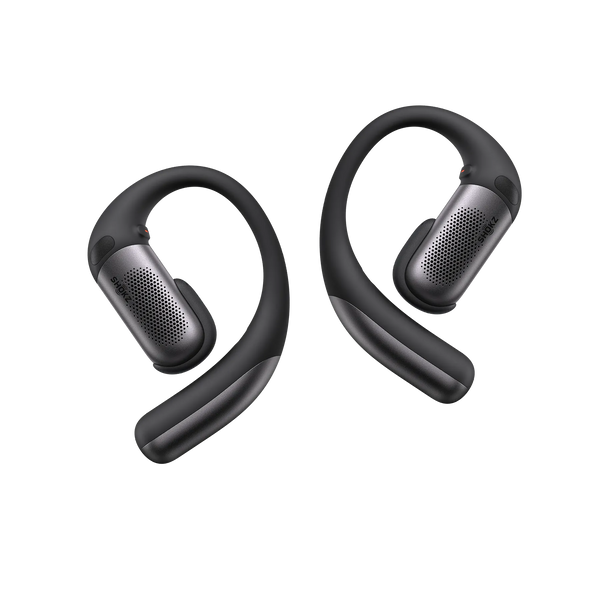
Frame-Mounted Buttons (Distributed Pressure): This is the ergonomic sweet spot. On models like the Shokz OpenFit Pro, buttons are built into the ear hook. The frame absorbs the pressing force, keeping your ear canal completely pressure-free and stable.
How to Clean Earbuds after Sweaty Runs:Physical Buttons & Touch Controls
Sweat is a headphone killer, but a quick post-run wipe-down will keep your gear race-ready:
-
Physical Buttons: Wipe the exterior with a slightly damp cloth to clear out salt crystals from the seams. If a button feels sticky, gently clear the gaps with a soft-bristled brush instead of rinsing it under a tap.
-
Touch Panels: Use a dry or lightly dampened microfiber cloth to wipe away the invisible salt film. This quickly cleans the conductive surface and brings back full touch responsiveness.
-
Dry Before You Dock: Always let your earbuds air-dry completely before putting them in their charging case. Trapped moisture on the metal contacts is the most common cause of charging failures, so making sure they are bone-dry is the golden rule.
FAQ
Q1: Are buttons or touch panels more "waterproof"?
A:It’s a toss-up. While touch panels have fewer seams, salt buildup from sweat can glitch their sensitivity over time. Conversely, sports-grade physical buttons use internal gaskets to stay sealed. As long as you wipe them after a run, buttons tend to remain more mechanically reliable in the long term.
Q2: Do buttons hurt more for runners with small ears?
A: Only if they are on the outer shell. Pressing "outer-panel" buttons creates a "plunger effect" that can be painful for narrow ear canals. If comfort is a concern, stick to frame-mounted buttons—they shift all the pressure to the ear hook, leaving your ear canal untouched.
Q3: Can I just "lock" touch controls to stop misfires?
A: You can in some apps, but it’s a trade-off. Locking them prevents accidental skips from sweat or hair, but it also means you can't adjust volume or track mid-race. Physical buttons give you that "locked-in" security without sacrificing the ability to actually use your controls.
Conclusion
Choosing between touch and physical controls usually comes down to where you run and how much you sweat. While touch surfaces offer a clean, modern aesthetic, the reality of a long-distance run involves moisture and movement that can make digital gestures unpredictable.
For many marathoners, the tactile feedback of a physical button provides a level of certainty that’s hard to beat when you're exhausted and dripping with sweat. If you’re looking for gear that handles these elements without the mid-run guesswork, explore the different fits available in the Shokz sports headphones lineup to see which one best matches your training style.