What Is Dolby Atmos? A Clear Guide to the Immersive Sound Technology

Dolby Atmos badges appear on many streaming apps, soundbars, and headphones, but owning a device with the logo doesn’t guarantee a true 3D experience. Understanding how Atmos works and which equipment actually matters helps you avoid buyer’s remorse. This guide explains the technology so you can decide if an upgrade makes sense for your setup.
What Is the Dolby Atmos
Dolby Atmos is an audio technology that adds height and 3D positioning to sound, creating a more realistic space. Instead of fixed channels, it treats sounds as objects in three-dimensional space, so you can hear effects coming from above or around you, while voices stay anchored to the screen. Standard audio can feel flat in comparison.
How Does Dolby Atmos Improve the Audio Experience?
Actual scenarios show what separates Atmos from older formats, whether you are gaming, streaming, or listening to new albums.
1. More Accurate Sound Positioning and Direction
Footsteps in games now appear precisely where they should be instead of just somewhere in the general vicinity. Car chases in movies flow smoothly through the room. Albums mixed for Atmos spread instruments across a much wider stage, placing backing vocals distinctly away from the lead rather than blending them together. You will hear sounds "behind and slightly left" far more often than just a vague noise in the rear.
2. Enhanced Sense of Height and Space
Height adds a vertical dimension that goes way beyond the usual flat plane. Thunder rolls overhead, aircraft pass above, and ambient sounds fill the vertical space in a way that standard audio cannot match. Even subtle touches benefit; leaves rustle above you, and birds fly past at realistic heights. Without this vertical layer, everything just collapses back down to ear level.
3. Clearer Audio Details in Complex Scenes
Busy action sequences often turn muddy when explosions and dialogue blend into one noise. Atmos separates these elements spatially so you can actually catch a whispered conversation during a gunfight. You’ll notice subtle effects that used to stay buried because sounds are no longer competing for the same narrow spatial zone.
What Is the Difference Between Dolby Audio and Dolby Atmos
Dolby Audio and Dolby Atmos serve different purposes in enhancing your listening experience. Dolby Audio handles general sound processing, such as volume normalization, bass adjustment, and dialogue clarity, improving existing audio without repositioning sounds spatially. Dolby Atmos, in contrast, creates three-dimensional sound fields by placing audio objects around you.
1. Sound Processing
Dolby Audio is all about making traditional stereo or surround sound play nicely with your specific device. Atmos, however, builds a spatial map from scratch. The cool part is they often work together: Audio makes the playback sound clean, while Atmos handles the actual 3D placement in the room.
2. Surround Sound Capabilities
Standard surround sound is stuck with fixed channels like 5.1 or 7.1, where noise just comes from a set of speakers. Atmos is object-based, so it scales to whatever gear you own. Whether you have a 5.1.2 setup or a massive 7.1.4 system, the sound moves as objects through the air rather than being locked to one specific box.
3. Immersion and Realism
Dolby Audio makes existing formats sound sharper through software tricks. Atmos changes how sound physically feels in your room by adding that crucial height layer. Sound wraps around and over you instead of just staying at ear level. That vertical dimension is something standard processing just can’t fake.
4. Device Compatibility
Most gadgets run Dolby Audio easily because it is mostly software. The catch with Atmos is that you need the whole chain: compatible content, a playback device that supports it, and the right speakers. While you can get a decent version of Atmos through regular headphones using virtual tech, dedicated hardware is always the way to go for the real deal.
How to Get Dolby Atmos
Getting the full Atmos experience requires a specific mix of hardware, software, and the right content. If one piece is missing, the whole thing falls flat.
1. Check Device Compatibility
Your playback device has to support Atmos from the jump. Most newer Apple TVs, Fire TV sticks, and Xbox consoles have this baked in. Take a look at your audio settings or double-check the specs online. If your player isn't compatible, you are just getting standard sound regardless of what your speakers can do.
2. Set Up Audio Hardware
Atmos performs best on gear built for spatial audio. Home theaters deliver full 3D sound, but headphones provide a simpler, more accessible way to experience it. For those who dislike traditional in-ear buds, the Shokz open ear headphones OpenFit Pro is a serious contender. It is optimized for Dolby Atmos while keeping an open-ear fit that supports open ear security and comfort, so you aren’t cut off from the world.
You get immersive sound and the option to flip on active noise reduction when you need to focus, all without the ear fatigue that comes with traditional buds.
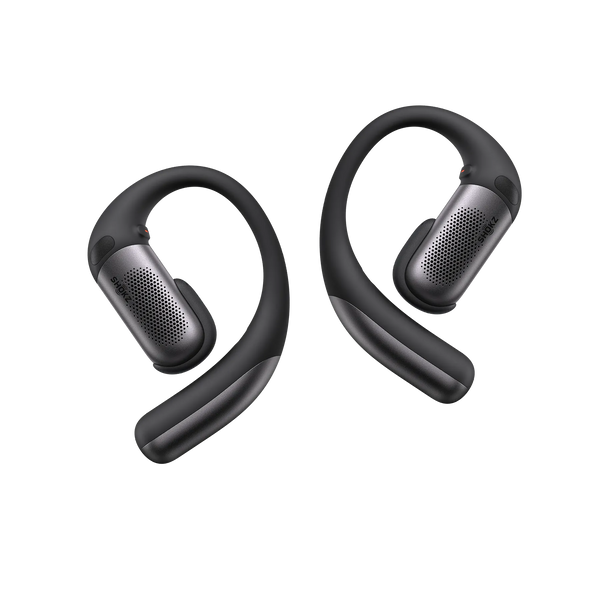
Here is how the OpenFit Pro actually handles Atmos in daily use:
-
Dolby Atmos Optimization: Head tracking keeps sounds anchored in 3D space, so turning your head doesn’t shift the sound.
-
Shokz SuperBoost™: Delivers dynamic, distortion-free audio with enhanced bass and clear high frequencies, preserving full spatial detail.
-
Open-Ear Noise Reduction: Active noise control in an open-ear design maintains clarity without sealing your ears.
3. Enable Dolby Atmos in System Settings
Don't assume Atmos will just turn itself on. You usually have to dig into the settings and pick it as your default format.
On Apple TV, go to Settings > Video and Audio > Audio Format. Windows users should grab the Dolby Access app from the store to get things moving. Once it is active, you will finally see that Atmos badge pop up on your favorite streaming apps.
Common Misconceptions About Dolby Atmos
Marketing often creates confusion around Atmos. Clearing up these myths is the best way to set realistic expectations for your own setup.
1. Dolby Atmos Does Not Always Mean Overhead Speakers
Physical ceiling speakers are not necessarily mandatory. Soundbars now use clever virtualization to simulate height, while headphones create spatial audio through special processing that tricks your brain into perceiving space. While dedicated height speakers definitely produce the most convincing effect, Atmos has evolved to work impressively well even with standard stereo headphones.
2. Dolby Atmos Depends on Content Support
Having Atmos-capable gear actually means nothing if the content itself wasn't mixed for the format. Standard stereo or 5.1 audio won't suddenly gain height just because you have the hardware. Creators have to master the audio specifically for object-based spatial placement during production. If the source isn't Atmos, your gear won't magically create it.
3. Dolby Atmos Quality Varies by Device
Is Dolby Atmos worth it? That really depends on your equipment. A $200 soundbar is going to produce vastly different results than a dedicated home theater with actual ceiling speakers. Headphone virtualization works great for personal listening, but it can't quite match physical sound from above. Even your room acoustics play a massive part in the final result.
FAQ
1. Does Dolby Atmos Require Specific Audio Codecs?
It mostly stays tied to Dolby Digital Plus for streaming or TrueHD if you are using Blu-ray discs. Most new streaming sticks and consoles won't have any trouble with them, but you might find that older gear needs a quick software fix to actually recognize the signal.
2. Is Dolby Atmos Useful for Podcasts?
Actually, no. Podcasts just don't have the spatial data that Atmos needs to do its thing. Since the tech can't just make up directionality out of nowhere, you really won't hear a difference compared to standard audio.
3. Why Does Dolby Atmos Sound Different Across Devices?
Every gadget handles Atmos metadata differently depending on its own processing power and speaker quality. Things like your room layout or even where you are sitting will always change the final vibe. It is never a "one size fits all" situation.
4. Can Dolby Atmos Improve Sound Quality on Mobile Phones?
Built-in phone speakers are way too small and cramped to deliver real 3D stage effects or high sound quality. If you are looking for that actual Atmos feel, you’ve got to use headphones or hook up to some decent external speakers.
5. Does Dolby Atmos Work With Regular Stereo Headphones?
It does. The Atmos renderer basically tricks your brain by turning spatial info into binaural stereo. You will definitely get better results with gear that has head tracking, but your everyday headphones can still give you a solid taste of the 3D effect.
Conclusion
What is Dolby Atmos? It really just comes down to audio that adds height and lets you pinpoint where a sound is coming from. It breathes new life into movies, games, and albums by letting sounds move in a 3D space rather than being stuck in a basic speaker channel. The cool thing is that it works on everything from top-tier home theaters to just a decent pair of wireless headphones. Whether you prefer different designs like ear hook vs clip-on earbuds, the right setup can help you enjoy a more immersive spatial audio experience. Get the setup right, and you will notice a huge jump in quality compared to the flat, old-school surround sound we’ve all been using for years.