Best Open-Ear Earbuds for Phone Calls in 2026: Comfort, Clear & All-Day Wear

Open-ear earbuds are a great option if you want clear phone calls without completely blocking out the world around you. Whether you're taking a quick call, sitting through a long meeting, or chatting while commuting, the right pair can make conversations much easier.
In this guide, we’ll cover how to choose open-ear earbuds for phone calls, highlight some of the best models in 2026, and share a few simple tips to improve call quality.
How to Choose Open-Ear Earbuds for Phone Calls
If you mainly use earbuds for calls, sound quality alone isn’t enough. Microphone performance, noise reduction, connection stability, and battery life all play a role in how smooth your conversations feel. Here are a few things worth paying attention to:
1. Microphone Quality
The microphone determines how clearly people hear you. Many modern models use multiple microphones and adaptive voice algorithms to separate your voice from background noise. This is especially helpful for calls in busy offices, coffee shops, or while walking outside.
2. Noise Reduction
Noise reduction in open ear earbuds focuses on keeping voices clear during calls rather than blocking outside sound. Many models use multiple microphones and AI voice processing to reduce environmental noise and prioritize speech, helping conversations stay clear in busy places like offices, coffee shops or while walking outdoors.
3. Bluetooth Stability & Multipoint Connection
Reliable Bluetooth keeps calls stable and free from lag. With multipoint connectivity, you can connect to two devices at once and easily switch between your phone and laptop.
4. Battery Life
If you spend hours on calls, battery life matters. Look for headphones that provide multiple hours of talk time. Quick charging can also be helpful if you need to power up before a meeting.
Best Open-Style Earbuds for Phone Calls in 2026
Open-ear earbuds are designed to keep you aware of your surroundings while making calls - whether at home, commuting, or working in the office. Here are five models that stand out in 2026:
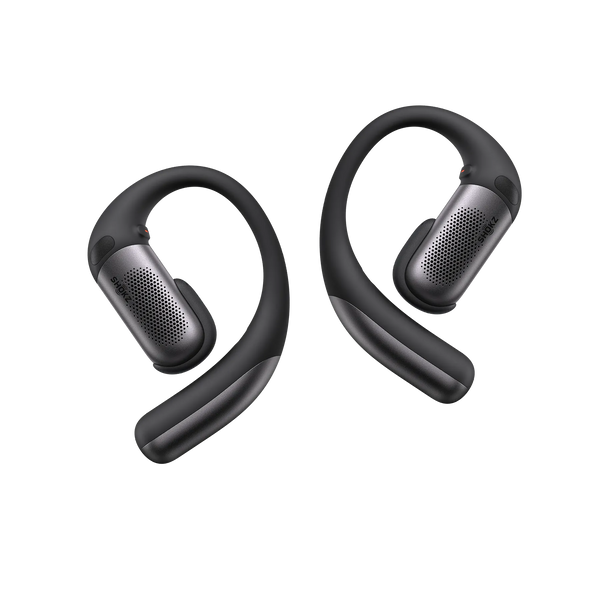
1. OpenFit Pro
OpenFit Pro works especially well in busy environments, making it a strong option for commuting, outdoor calls, or long conversations. The flexible ear hooks keep the earbuds secure, while the open-ear design lets you stay aware of traffic or coworkers during calls.
Many commuters mention that calls remain clear even while walking through busy streets. It also works with the Shokz App, allowing users to manage multipoint connections, adjust EQ modes, and customize button controls for easier call handling.
Key Features
-
AI-powered triple-microphone system with wind-control technology reduces up to 99.4% of background noise
-
DirectPitch™ 3.0 and SuperBoost™ improve sound while minimizing audio leakage
-
Titanium ear hooks and Ultra-Soft Silicone™ 2.0 for stable, long-term comfort
-
Up to 50 hours total battery life with Qi-compatible wireless charging
2. OpenRun Pro 2
OpenRun Pro 2 is a great option for users who take calls on the move. The lightweight wraparound design stays secure during movement, making it ideal for calls on the go. DualPitch™ technology reduces vibrations, allowing clear voice transmission without tactile distractions, which many runners find helpful when taking calls during walks or workouts.

Key Features
-
10th-generation Bone Conduction with DualPitch™ Technology for comfortable long calls
-
Up to 12 hours of battery life with just a 5-minute quick charge
-
Flexible Ni-Ti memory wire frame for a secure fit
3. OpenDots 2
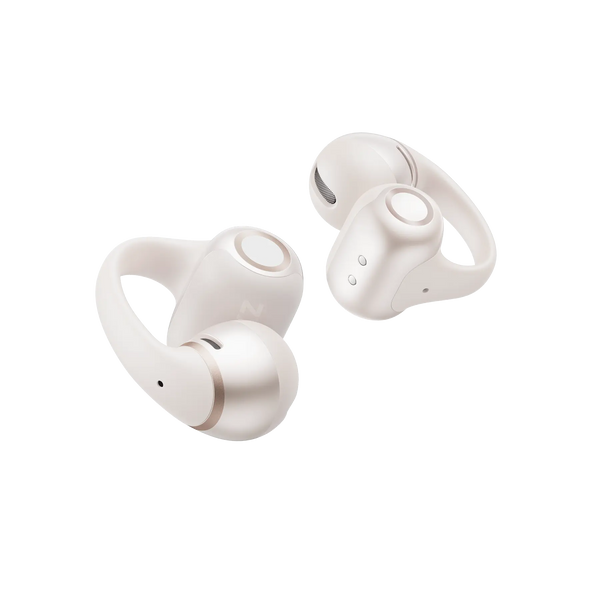
OpenDots 2 open-ear clip-on earbuds are suited for all-day calls and everyday use. Their lightweight build, featuring a clip-on design that grips the ear's outer rim for a secure yet non-intrusive fit, makes them comfortable for long conversations at home, in the office, or during commutes. Many users highlight how light the earbuds feel even after several hours of use. A 3-microphone system and DirectPitch™ technology ensure your voice is heard clearly while you remain aware of your surroundings.
Key Features
-
3-microphone system and DirectPitch™ technology with a dual-driver system to significantly improve voice and audio clarity
-
Lightweight 6.4g earbud with a soft silicone fit guarantees comfort during long calls
-
Up to 40 hours of total battery life with a wireless charging case
-
MultiPoint pairing allows switching connections between devices seamlessly
4. OpenComm 2 UC 2025 Upgrade
OpenComm2 UC is built for professional calls and hybrid work. The adjustable boom microphone delivers precise voice pickup for meetings and conference calls, which remote workers often say helps keep voices clear even during long discussions.
The headset is Zoom-certified and optimized for major collaboration platforms, making it suitable for remote work setups where stable call performance and meeting compatibility are important.

Key Features
-
DSP & Qualcomm cVc technology reduces ambient noise with an adjustable boom mic
-
7th-generation Bone Conduction with PremiumPitch™ 2.0 for clearer conversations
-
Up to 16 hours of talk time with USB-C charging
-
Lightweight wraparound frame and soft silicone finish for all-day comfort
5. OpenMeet
OpenMeet is suitable for long virtual meetings and conference calls. Its ergonomic frame stays comfortable through extended sessions, and professionals who spend hours in online meetings often note that the open-ear design helps reduce ear fatigue compared with traditional headsets. The open design also keeps you aware of what's happening around you, while a dedicated mute button makes it easier to control conversations during meetings or phone calls.
Key Features
-
Dual-microphone with Qualcomm cVc tech reduces background noise by 98.6%, ensuring clear calls even in busy environments
-
TitaniumFlex pressure-free design with interchangeable cushions stays comfortable - even with glasses
-
Up to 15 hours of battery life with fast USB-C charging
|
Product |
Best For |
Comfort |
Battery |
|
OpenFit Pro |
Busy environments, commuting |
Titanium ear hooks + Ultra-Soft Silicone™ 2.0 |
Up to 50h with charging case |
|
OpenRun Pro 2 |
Active users, outdoor calls |
Ni-Ti lightweight memory wire |
Up to 12h |
|
OpenDots 2 |
Everyday calls |
Ultra-light 6.4g earbuds, soft silicone |
Up to 40h with charging case |
|
OpenComm2 UC 2025 Upgrade |
Work calls |
Flexible wraparound frame + soft silicone |
Up to 16h (USB-C) |
|
OpenMeet |
Long virtual meetings |
TitaniumFlex + interchangeable temple cushions |
Up to 15h (USB-C) |
Tips to Improve Call Quality with Open-Ear Headphones
Even the best earbuds work better with a few small adjustments. These tips help make calls clearer and smoother:
1. Proper Earbud Positioning for Clearer Voice Pickup
Wireless headphones should sit just above your ear canal. A quick adjustment can improve microphone alignment. Check them before calls to avoid muffled audio or uneven voice pickup.
2. Environmental Noise Control for Clearer Conversations
If possible, step away from traffic or construction sites. If your earbuds include AI noise reduction, make sure the feature is enabled. Even simple adjustments - like turning your body away from the wind - can noticeably improve call clarity.
3. Regular Firmware Updates and Bluetooth Optimization
Firmware updates can improve microphone performance and noise filtering. If audio becomes choppy, reconnect your earbuds or reset Bluetooth, and make sure the active device is prioritized when using multipoint.
FAQ
1. Do Open-Earbuds Support Multipoint Connectivity for Calls?
Some models do. Check the specs before purchase if you plan to connect to two devices and switch between them.
2. How Long Does the Battery Typically Last During Phone Calls?
Many models handle around 8-12 hours of talk time, with longer use when using a charging case. Volume levels and background noise can also affect the battery life.
3. Can Open-Ear Earbuds Work Well for Calls While Walking or Commuting?
Yes. Open-ear designs help maintain situational awareness, which is useful outdoors.
4. Do Open-Earbuds Leak Sound During Phone Calls?
Some sound leakage is normal. Features like directional audio or noise reduction help reduce it, but it might still be noticeable in very quiet spaces.
5. Can Open-Earbuds Connect to Laptops for Work Calls?
Many models support laptops and work with apps like Zoom, Teams, and Google Meet. Compatibility may vary depending on your laptop, operating system, and the earbuds’ connection type, so it’s worth double-checking.
Conclusion
Open-ear earbuds make phone calls easier without cutting you off from your surroundings. Clear audio, stable connections, and situational awareness make them a practical option for commuting, working, or taking calls while moving around. Models like OpenFit Pro and OpenRun Pro 2 show how Shokz open ear headphones combine these benefits with reliable call performance, helping conversations stay clear while the outside world remains audible.