Cycling Headphones Varia Radar Beeps: Why Riders Miss the Alert, and What Changes on the Road

Road riders have become more precise about audio. A few years ago, the question was mostly whether to ride with headphones at all. Now the question is narrower: how to hear the road, hear alerts, and avoid losing important sounds once speed, wind, and traffic begin to stack up. That is why riders searching for cycling headphones via radar beeps often compare open-ear and cycling-focused listening setups rather than treating every headphone the same way.
The search usually starts after a specific moment. The radar detects a vehicle. The screen shows the alert. But the rider either misses the sound, hears it late, or catches a tone so faint that it blends into wind and tire noise. At that point, the issue is no longer just radar detection. It becomes a question of alert routing, headphone design, and audibility under real riding conditions.
Why Cycling Earbuds Varia Radar Beeps Get Missed on the Road
Wind Noise, Road Speed, and Low Default Alert Volume
In many cases, a missed beep has less to do with the radar detecting traffic than with what the rider's ears are handling at 20 mph, 30 mph, or on a descent. Wind around helmet straps, road noise, passing vehicles, and the general rise in background sound can make a short alert harder to notice.
Rider discussions reflect the same experience. One complaint describes cycling audio as “pretty quiet during cycling with the wind,” while another points to strong wind on fast descents making alerts harder to hear.
The effect is easy to understand. A short alert has limited time to stand out from the surrounding noise. When the output level is low or wind noise is high, the tone may be easier to miss before the rider fully registers it.
The Moment Riders Start Looking for a Fix
Most riders do not search for this problem before their first ride. The search often starts after a missed alert. A setup that seems obvious through a head unit speaker while riding without headphones can feel different once headphones become part of the audio path.
The question then changes from “can I pair this?” to “can I hear and rely on the alert outside?” Riders start looking beyond basic compatibility and toward a setup that works with their actual riding conditions.
When the Beep Seems to Disappear Once Headphones Are On
This is where open-ear and bone conduction options enter the discussion. The reason is not simply that they are designed for cycling. Their listening designs leave the ear canal unobstructed, which can allow riders to keep access to surrounding sounds while receiving audio from a connected device.
That can be useful when a short alert has to compete with wind, traffic, and road noise. It does not guarantee that every alert will be easy to hear, though. Volume, audio routing, fit, speed, and riding conditions still affect the final result.
How the Varia Alert Sound Actually Reaches Your Ears
Radar to Garmin Head Unit, Phone, or App: The Audio Path That Matters
A lot of confusion begins here. The Varia radar detects approaching traffic, while the audible alert you hear depends on the connected device and audio path in the specific setup. Depending on the model and configuration, a Garmin head unit, phone, compatible app, or another connected device may handle the alert output.
The useful question is therefore not only whether the radar is connected. It is whether the device handling the alert can route that audio to the headphones being used.
Why the Varia Does Not Usually Beep Into Headphones by Itself
This distinction is important. The radar's job is to detect approaching traffic and communicate that event to a compatible connected system. The audible alert may then be produced or relayed by the device handling the alert rather than by the radar acting as an independent headphone audio source.
That means several parts of the setup can affect what the rider ultimately hears: the Varia model, connected device, Bluetooth connection, audio routing, volume, and the listening environment.
Checking Whether Your Current Setup Can Pass Alerts Into Cycling Headphones
Once the audio path is clear, troubleshooting becomes more practical. Check which device is generating the audible alert. Confirm that the headphones are connected to that device when required. Check whether media audio is routed correctly and whether alert sounds are enabled. Then compare the alert in a quiet setting with what happens once wind and road noise increase.
This is also where open-ear models can become worth considering. They are being evaluated as the final listening point in the alert chain, where the goal is to receive the alert while keeping the ear canal unobstructed rather than fully isolating the rider from surrounding sound.
Which Cycling Headphone Styles Make Varia Radar Beeps Easiest to Hear
Bone Conduction for Open-Road Awareness and Audible Alerts
Bone conduction can suit this use case because it leaves the ear canal unobstructed. That gives riders access to surrounding sounds while audio is delivered through the headphones. For cyclists who want alerts, music, and road awareness to coexist, this can provide a different balance from sealed in-ear designs.
For riders who prefer bone conduction, Shokz OpenRun Pro 2 is a practical option for longer outdoor sessions. Its DualPitch™ Technology supports the open-ear listening design, while up to 12 hours of battery life can suit extended rides. An IP55 rating also provides practical resistance to sweat and moisture during outdoor use. The experience can still vary with wind, speed, fit, and alert routing.

Open-Ear Headphones in Steady Traffic and Moderate Wind
Open-ear designs beyond bone conduction can also suit cycling, particularly for riders who want an open listening experience without the feel of an in-ear seal. Because the ear canal remains unobstructed, surrounding sound remains accessible while audio plays from the headphones.
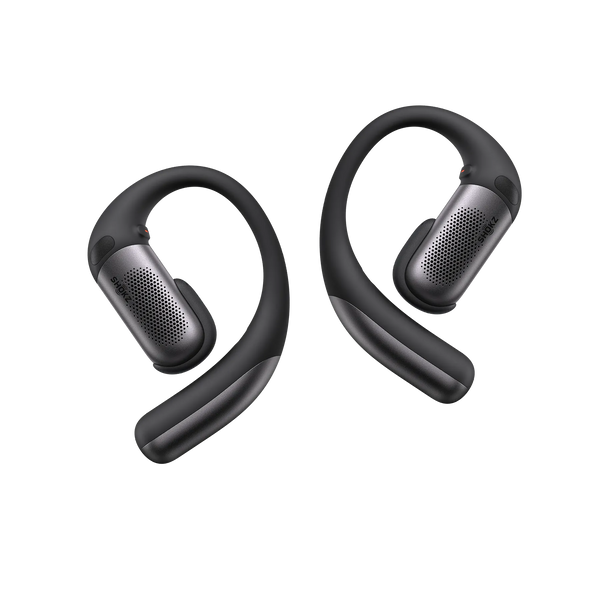
For riders who want an open-ear design with additional noise control, Shokz OpenFit Pro features Open-Ear Noise Reduction and a triple-microphone system designed to help manage environmental noise. Its secure titanium ear hooks and Ultra-Soft Silicone™ 2.0 are designed for a stable fit during active use, making it a relevant option for steady rides and everyday sports use.
In-Ear Options When Fit Is Secure but Outside Noise Changes the Result
In-ear headphones can work, but the experience varies more from rider to rider. A secure fit can help maintain consistent audio, while the seal also changes how much outside sound reaches the ear naturally. Some riders use a single earbud or a lighter seal to change that balance, but each approach adds another variable to the setup.
Fit and connectivity matter as well. A loose earbud, unstable Bluetooth connection, or dropped side can make a short alert easier to miss. Open-ear designs change that balance by reducing the physical isolation created by a sealed ear canal.
Why ANC and Transparency Modes Can Make Cycling Headphones Varia Radar Beeps Harder to Catch
ANC and transparency can behave differently in windy riding conditions because their microphones and processing have to deal with wind as well as the intended environmental sound. A mode that feels useful while walking or commuting may not behave the same way on a fast ride.
That does not mean ANC or transparency will be problematic on every ride. Performance depends on the headphone design, wind conditions, fit, and processing. Riders who find processed modes distracting in strong wind may prefer a simpler open-ear listening setup that does not depend on the same type of noise processing.
Setting Up Cycling Headphones Varia Radar Beeps So Alerts Are Audible at Speed
Raise Alert Volume on the Garmin Head Unit or Paired App
Start with the simplest variable: the volume of the device producing the alert. If the head unit or app is set too quietly, increasing headphone volume alone may not address the underlying issue.
Test Beep Timing Before Riding Into Wind or Traffic
Do not make the first real test happen in moving traffic. Test the alert behavior in a controlled setting and listen for the full tone. Then repeat the check under conditions that are closer to your normal riding environment.
Use Routing, Pairing, and Fit Checks to Avoid Faint or Cut-Off Alerts
Confirm that the correct device is paired to the headphones and that the intended audio route is active. Check that alert sounds are enabled and that the headphones maintain a stable connection. With two earbuds, verify that both sides connect consistently. With open-ear or bone conduction headphones, check that the fit and position remain stable during movement.
When Riders Start Comparing Bone Conduction and Open-Ear Setups After Failed Volume Tweaks
Once volume and pairing have been checked, headphone design becomes another factor worth evaluating. Bone conduction and other open-ear designs offer different ways to balance headphone audio with access to surrounding sound. The choice is less about one category being universally better and more about which listening approach fits the rider's typical speed, wind conditions, traffic environment, and personal preference.
Comparing Real Riding Setups for Hearing Cycling Headphones Varia Radar Beeps Reliably
Bone Conduction Plus Garmin Head Unit Audio
A bone conduction setup paired with a compatible Garmin head unit can keep the alert path relatively straightforward while leaving the ear canal unobstructed. The actual experience still depends on the specific Varia, head unit, audio connection, and riding conditions.
Phone-Based Alert Routing With Open-Ear Headphones
A phone-centered setup can also work for riders who already use a compatible app for alerts. The additional routing steps make it worth checking Bluetooth connections, app permissions, alert settings, and audio output before riding.
Single-Ear and Dual-Ear Setups Riders Use in Practice
Some riders prefer one earbud to leave more of the road audible. Others use dual-ear open designs because they do not seal the ear canal in the same way as conventional in-ear headphones. The better fit depends on the rider's preferred balance between audio playback, comfort, and environmental awareness.
What Changes on Descents, in Crosswinds, and in Heavy Traffic
This is where riding conditions become especially important. Descents can raise wind noise quickly. Crosswinds can make short tones harder to distinguish. Heavy traffic adds competing sounds from several directions.
No headphone setup removes those variables. Open-ear and bone conduction designs may offer a different balance between audio playback and environmental awareness because they do not seal the ear canal in the same way as conventional in-ear designs.
Choosing a Setup You Can Trust for Cycling Headphones Varia Radar Beeps
What to Validate Before Relying on Alerts Outside
Validate the full chain before the ride: radar detection, alert source, Bluetooth or other audio routing, headphone volume, and audibility at realistic speed. An alert that is clear in a quiet driveway may be harder to notice once wind and traffic increase.
How Safety, Local Rules, and Hearing the Road Fit Into the Decision
Local rules on headphone use vary, and riders still need to pay attention to surrounding traffic. A radar alert can provide an additional awareness cue, but it does not replace direct attention to the road or applicable local cycling rules. Open-ear categories may appeal to riders who want to hear alerts without fully isolating themselves from surrounding sound.
The Outcome Riders Are Actually Looking For
The goal is not simply louder beeps. It is a setup where the alert is reasonably audible under typical riding conditions while the rider retains the level of environmental awareness they need.
That is the real question behind cycling headphones varia radar beeps. Riders are not simply choosing headphones. They are deciding how radar detection, alert routing, audio playback, and road awareness should work together on an actual ride.


