How to Use Dolby Atoms to Unlock Better Shokz Performance

Open-ear listening gives you a different relationship with sound. You can enjoy music, podcasts, and video while staying aware of what is happening around you. But when you want a more immersive experience, the right audio settings can make a noticeable difference.
That is where Dolby Atmos comes in. With Shokz, the experience depends on more than simply turning a feature on. EQ, firmware, fit, and the listening environment can all affect how spatial audio comes across.
Here’s how to get the most from the setup without overcomplicating it.
What Open Ear Headphones Need for a Better Dolby Atmos Experience
Start with the basics before changing every setting
It is easy to assume that a more immersive sound simply comes from enabling Dolby Atmos. In practice, the experience also depends on the audio source, EQ settings, and how the headphones sit on your ears.
Since your surroundings remain part of what you hear, background noise can make some details harder to notice. A good starting point is to keep your EQ balanced and listen for what feels missing. The right adjustment—like adding presence for dialogue or balancing bass for music—depends on the content and environment rather than one setting working for everyone.
What a well-tuned Dolby Atmos experience can feel like
When working with a suitable source and well-matched settings, Dolby Atmos can make music and video feel more spacious, with easier instrument separation and a stronger sense of movement.
On the Shokz OpenFit Pro, the Dolby Atmos feature can be activated through the Shokz App. You can use it on its own, or enable Head Tracking—available once Dolby Atmos is turned on—to add a more dynamic sense of sound positioning as your head moves.
The goal is not to make every track sound dramatically different. It is to create a more immersive presentation while keeping the open-ear experience practical for everyday listening.
How Open Earbuds Use EQ and Dolby Atmos Together
Start with EQ before changing everything else
If you want to understand how to use Dolby Atmos effectively with open earbuds, start with the basic EQ balance.
Dolby Atmos can change how compatible content is presented, but EQ still shapes the underlying tonal balance. A setting that sounds good for music may not be the most comfortable choice for podcasts, calls, or long listening sessions.
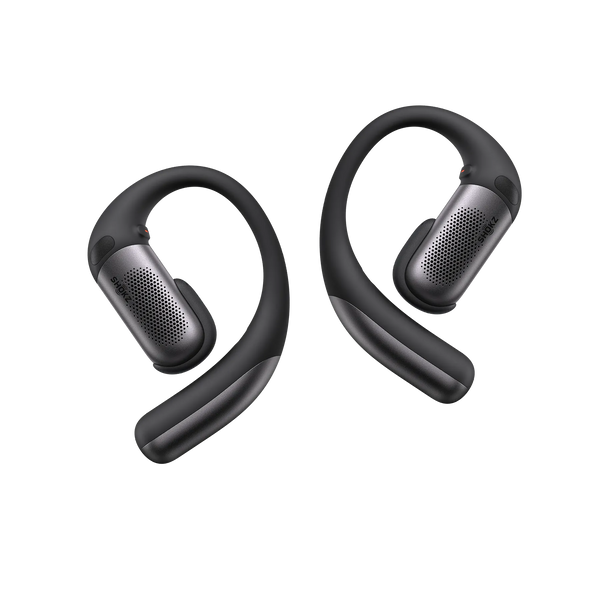
Through the Shokz App, you can access the OpenFit Pro's five preset EQ modes—Standard, Vocal, Bass Boost, Treble Boost, and Private—along with two custom EQ modes. This gives you room to adjust the sound without having to settle for a single profile.
A simple approach works well:
-
Use Standard as a starting point for everyday listening.
-
Try Vocal when speech and dialogue need more presence.
-
Use Bass Boost when you want more emphasis in the low end.
-
Try Treble Boost when you want more high-frequency detail.
-
Create a custom profile when your preferred balance falls somewhere between the presets.
EQ will not fix every limitation of a recording or listening environment. It is better used as a way to fine-tune the presentation after you have a solid baseline.
Keep your open earbuds updated
Firmware is easy to overlook because it happens in the background. But keeping your headphones updated can help ensure that you are using the latest available features and improvements.
The Shokz App can keep you informed about firmware updates for compatible products.
If the listening experience seems different after changing settings, check the app and firmware status before making several adjustments at once. Changing one thing at a time makes it easier to understand what actually improved the sound.
Calls still depend on the microphone setup
Dolby Atmos affects the listening experience, but it does not determine call quality. Calls use a different part of the device's audio system, so it is worth treating playback and voice pickup as separate considerations.
For OpenFit Pro, Shokz uses a triple-microphone system with AI-powered voice processing designed to reduce background noise and improve voice clarity. Wind-control technology is also built into the call system.
In practice, microphone performance can still vary with wind, clothing, positioning, and the surrounding environment. Keeping the microphone area clear can help avoid unnecessary interference.
How Open Ear Headphones Fit Can Affect What You Hear
Fit is part of the listening experience
Audio settings are only part of the equation. With open ear headphones, fit can affect how consistently sound reaches your ears.
A loose or uneven fit may change how you perceive bass, vocals, or overall volume. A fit that is too tight can become distracting during longer sessions.
OpenFit Pro uses titanium ear hooks and Ultra-Soft Silicone™ 2.0 to provide a secure fit while keeping the open-ear design comfortable for extended wear.
The useful takeaway is simple: before changing EQ repeatedly, make sure the earbuds are sitting in a consistent position.
Glasses, helmets, and winter gear can change the fit
Accessories can subtly change how open ear headphones sit.
Glasses may press against an ear hook. A helmet strap can shift the position of the headphones. Hats and headbands can add pressure around the ears.
If the sound suddenly seems different after putting on another piece of gear, check the fit first. Small changes in position can affect how the sound reaches your ears.
Movement can reveal fit issues
A setup that feels comfortable at a desk may move differently during a run or workout.
For active use, check that the ear hooks sit securely and evenly before increasing the volume or changing the EQ. If the sound becomes noticeably different after extended movement, reposition the headphones before assuming the audio source or settings are responsible.
There is no single fit that works the same way for every person. Consider how much you move, how long you wear the headphones, and whether glasses, helmets, or other headwear are part of your routine.
How to Use Dolby Atmos in Real Life: Three Demanding Scenarios
Different environments can change how immersive audio feels. Instead of treating Dolby Atmos as a one-setting solution, adjust the setup around the situation.
|
Environment |
Common listening challenge |
Useful adjustment |
Practical tip |
|
Cycling |
Wind and road noise can mask some audio detail |
Try a vocal-focused EQ for navigation or spoken content |
Check fit after putting on your helmet and keep volume at a level that lets you stay aware |
|
Open office |
Conversations and background noise can compete with quieter content |
Try Standard or Vocal depending on what you are listening to |
Keep the volume moderate so you can still respond to people around you |
|
Long-distance running |
Fit changes and listening fatigue can become more noticeable over time |
Use a familiar EQ profile rather than making frequent changes during the run |
Check the fit if the sound changes instead of immediately changing the EQ |
No open-ear headphone can remove every environmental distraction. The advantage is being able to combine immersive audio with awareness of your surroundings.
How to Use Dolby Atmos with the Shokz App
Connect your headphones and check the available settings
The Shokz App is the main place to manage compatible OpenFit Pro audio settings.
Once your earbuds are connected, you can use the app to access EQ profiles, enable Dolby Atmos optimization, manage supported controls, and keep track of firmware updates.
For Dolby Atmos, start with the default settings and listen to a piece of compatible content. Then make small EQ adjustments if needed. This makes it easier to tell whether a change actually improves the experience.
Turn on Dolby Atmos and try Head Tracking
OpenFit Pro is specifically optimized for Dolby Atmos. The feature can be activated through the Shokz App, where you can also access Head Tracking.
Head Tracking changes the perceived position of the sound as your head moves. For compatible content, this can make the presentation feel more anchored and dynamic.
It is worth trying both with and without Head Tracking. Some listeners may prefer the more fixed presentation for casual music, while others may enjoy the additional sense of movement with compatible movies, shows, or music.
Keep customization simple
You do not need to change every setting at once. A practical setup is:
-
Connect the OpenFit Pro to your device.
-
Open the Shokz App.
-
Find the "Optimized for Dolby Atmos" section and turn on the Dolby Atmos switch (Head Tracking is an optional, separate switch available only after this is enabled).
-
Start with the Standard EQ.
-
Try compatible Dolby Atmos content.
-
Adjust the EQ only if something feels too soft, sharp, or recessed.
-
Check for firmware updates when available.
This gives you a clear baseline before you start experimenting.
FAQ
Does Shokz support Dolby Atmos?
Yes. Shokz OpenFit Pro is optimized for Dolby Atmos, and the feature can be activated through the Shokz App. Shokz says OpenFit Pro also uses Head Tracking to support a more dynamic spatial listening experience.
Can Dolby Atmos improve the sound of open ear headphones?
It can create a more immersive and multidimensional presentation with compatible content. The result still depends on the source, headphones, fit, EQ, and listening environment, so Dolby Atmos is not a guarantee of better sound for every recording or listener.
So, How to Use Dolby Atmos With Shokz?
The practical answer is straightforward: use a compatible Shokz product, enable Dolby Atmos where supported, and then fine-tune the experience around your content and listening environment.
With Shokz OpenFit Pro, Dolby Atmos optimization is built into the listening experience and can be activated through the Shokz App. The app also gives you access to EQ customization and firmware updates, while the fit of the earbuds helps determine how consistently you hear the result.
If you want to explore a Shokz model built specifically around this experience, Shokz OpenFit Pro is the most relevant place to start.
The bigger takeaway is that Dolby Atmos is not simply a switch. The source, EQ, fit, firmware, and environment all play a role in how immersive open-ear audio feels.